Unlock Telegram New HD Photo Sharing Power!
Discover Telegram’s new HD photo sharing! Learn how to send sharper, high-definition images in your chats, groups, and channels.
If you are one of those Telegram users who are tired of the quality of your photos being reduced when uploading them to Telegram, Telegram now has a new feature for you! With the new version of Telegram released in June 2025, you can send HD images with low volume to your friends or Telegram groups and channels.
Telegram has given you the opportunity to determine whether you want to upload and send low-quality SD photos or high-quality HD photos. So stay with us so that we can explain the complete explanation and how to upload HD photos to you.
How We Used to Share: The Quality Versus Speed Dilemma
Before this shiny new HD option, sharing photos on Telegram usually meant one of two things.
First, you had the standard way. Telegram would compress your photos to send them quickly and save on data. This was super convenient for fast sharing, but often, especially with detailed shots or images with text, you’d notice a drop in sharpness.
Second, to keep every single pixel perfect, many of us chose to send photos “as a file”. This preserved the original quality, which was great, but it also meant larger files. These could take longer to send and download, eat up more data, and sometimes weren’t as easy to preview right in the chat. It was a constant balancing act.
Hello, HD Photos: The Best of Both Worlds?
Telegram’s new HD photo feature, which started appearing around early June 2025 , looks to solve this dilemma. It lets you send pictures that are much more detailed. We’re talking about images with significantly more clarity, reportedly offering four times the pixels of a standard compressed photo.
The really impressive part? It does this while keeping the file size surprisingly small, often under half a megabyte.
This means your beautiful vacation landscapes, those important screenshots with tiny text, or even just a really good selfie will arrive looking crisp and clear for whoever you’re sending them to.
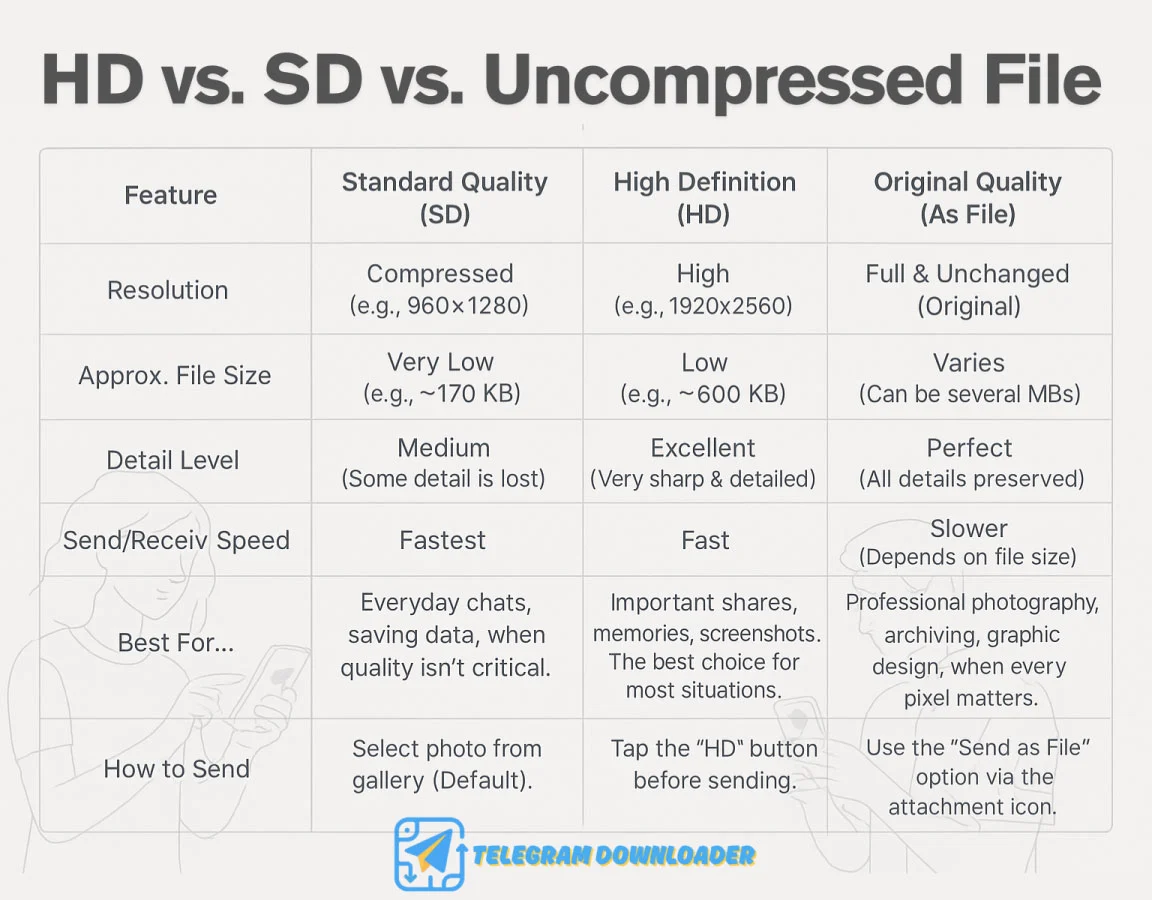
Early tests showed a standard photo at a resolution like 960×1280 (around 174KB) could jump to an HD version at 1920×2560 (around 589KB). That’s a noticeable improvement in detail without a massive hit on file size.
Sending HD Photos: It’s Easier Than You Think
Ready to send some high-definition goodness? Telegram has made it pretty simple. Here’s how you can do it:
- First, open the chat where you want to share your picture.
- Next, tap the usual attachment icon (the paperclip) and pick the image or images you want to send.
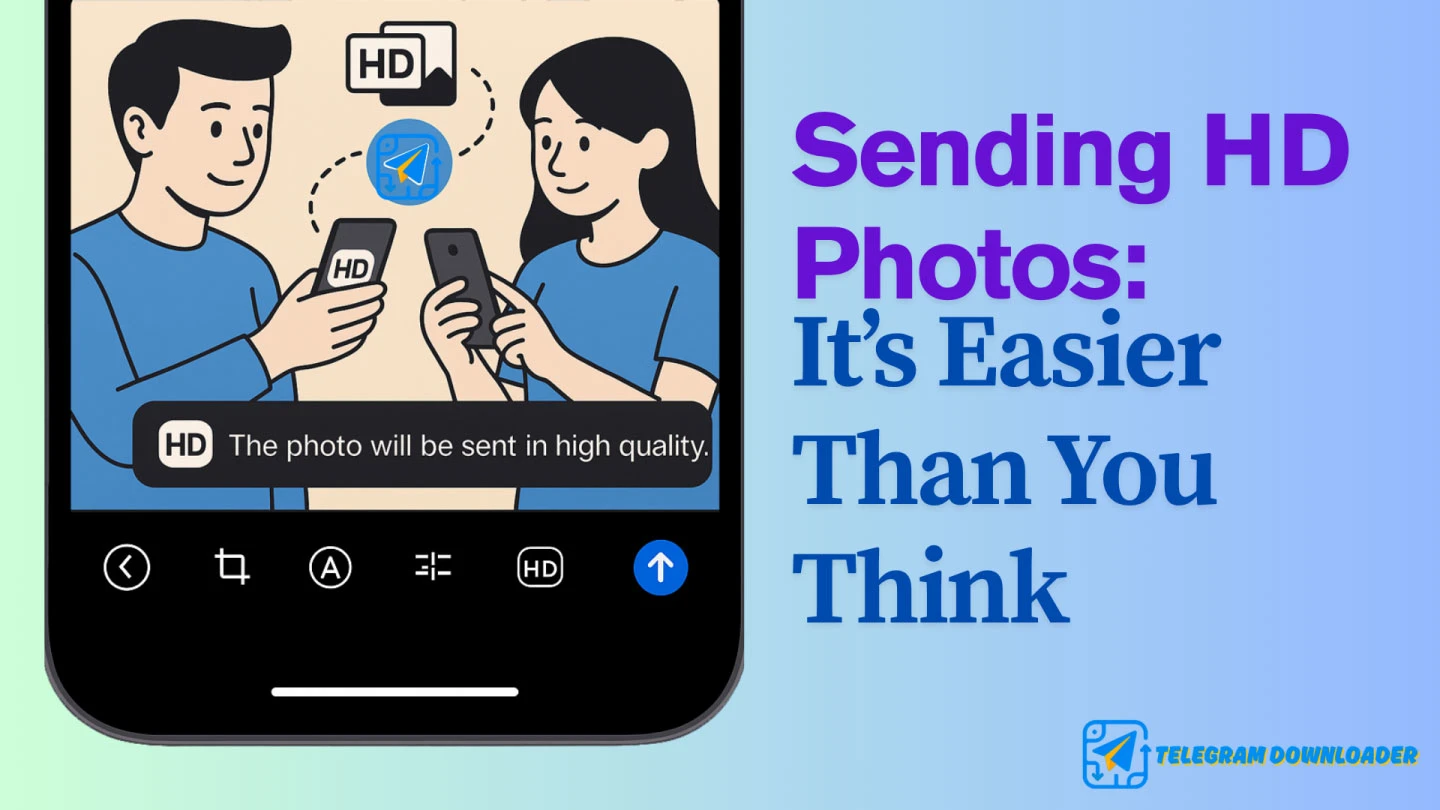
- Now, before you hit that send button, take a look at the top of the photo editor screen. You should spot an “HD” icon. Sometimes it might show “SD” first, and you just tap it to switch to “HD”.
- Give that HD icon a tap to turn the High Definition option on. The app might even pop up a little message saying something like, “The photo will be sent in high quality”.
- And that’s it! Send your photo off.
Some users might also find an option like “Send in High Quality” directly in the attachment menu after selecting their images, which does the same thing. Whichever way you see it, it’s a straightforward process.
Receiving and Admiring Your HD Photos
When someone sends you an HD photo, it’ll arrive in your chat just like any other picture. From what we know, there isn’t a special “HD” badge that appears on the photo once you’ve received it. The main thing is that the sender chose the HD option. You’ll simply notice the image looks much clearer and more detailed than what you might be used to.
To save an HD photo, you can usually tap the image to view it full screen. Then, look for the three-dot menu (it often looks like ⋮) and select “Save to gallery”. You can also use the Telegram downloader tool to convert the image into a direct link and download it directly.
Where does the HD image-sending feature work?
Good news on this front! This HD photo feature is a general improvement across Telegram. That means you should be able to send and receive these higher-quality images pretty much everywhere you share photos on the platform. This includes:
- Your personal one-on-one chats with friends and family.
- Those lively group chats.
- And even in Telegram channels.
So, no matter the context, you can opt for that extra clarity.
The Real Difference: HD vs. Standard vs. Uncompressed File
Let’s talk about what this “power and quality” really means for your images.
With “4 times the pixels”, you’re going to see a lot less blur and pixelation, especially if you zoom in or look at the photo on a bigger screen. Those fine details will really pop.
While the quality is much better than the old standard compression, HD photos are still cleverly optimized. They are significantly smaller than sending the original, uncompressed image as a file. This is great for saving your mobile data and the storage space on your device, and for the person receiving it too.
Think of it this way: that HD photo might be around 589KB, while the standard version was 174KB. An uncompressed original could easily be several megabytes. The HD option finds a really nice sweet spot.
It just makes sharing good-looking photos much less of a hassle. You don’t have to choose between a quick, blurry share or a big, clunky file transfer for your everyday needs anymore.A Heads-Up for Android Users
When this feature first started rolling out, some Android users noticed that the HD toggle didn’t always seem to send a higher-resolution image, even if “HD” was selected. It appeared to be working fine on iOS from the start.
These kinds of little bumps can happen with new software releases. The best thing to do is to make sure your Telegram app is always updated to the very latest version you can get from the Google Play Store or Apple App Store. Developers are always releasing updates with fixes and improvements.
Why Telegram HD images is a great feature for you to use?
Telegram HD photo feature is more than just a small update; it genuinely makes using Telegram better in a few key ways:
- Better Memories: Share those special vacation shots, family moments, and event pictures with the sharpness they truly deserve.
- Clearer Info: Sending screenshots of documents, instructions, or anything with text becomes much more readable. No more squinting!
- More Professional: If you use Telegram for work or creative projects, sharing design mockups, product photos, or visual references in HD can make a real difference in how they’re perceived.
Go Forth and Share in HD!
Telegram’s new HD photo sharing is a fantastic step forward. It hits that sweet spot between great image quality, manageable file sizes, and being super easy to use. It’s clear Telegram has listened to what users wanted.
So, make sure your app is updated, and give it a try. Start sending those beautifully detailed HD photos. Your friends, family, and colleagues will definitely notice the difference!
Do I have to pay for this HD feature?
Thankfully, no. This is one of those features Telegram gave to everyone, not just Premium subscribers. So you can send better-looking photos without paying anything extra.
Will sending HD pictures eat up my mobile data?
It uses a bit more data, for sure, but it’s not a huge jump. The files are still pretty small. You probably won’t even notice a major difference in your monthly usage unless you’re sending hundreds of them a day. It’s a very reasonable trade-off for getting pictures that aren’t a blurry mess.
Is the ‘HD’ option just the same as sending a photo ‘as a file’?
They’re definitely different. Sending “as a file” is for when you need the absolute original, massive file with zero changes think a photographer sending a shot to a client. The HD option is the smart choice for everything else. It makes your photo look crisp and great for sharing, but it’s been optimized to stay a reasonable size. For 99% of what you send, HD is the right call.