
Telegram Disable Sharing
In March 2026, Telegram added a setting that a lot of people had been asking for: a way to stop the other person in a private chat from passing your messages around.
It is called Disable Sharing, and it is easy to confuse with an older setting that does something similar for channels and groups. Here is what the new one does, how to turn it on, and where it fits.
What it is
Disable Sharing works in 1-on-1 chats. You switch it on for a specific person, and from then on the messages in that conversation can’t be shared out of it. Telegram described the purpose as fostering “an atmosphere of mutual trust”. In practice it means you can talk more freely, without wondering whether your message is about to be forwarded into someone’s group chat.
It is a per-chat setting. Turning it on for one person changes nothing in your other conversations.
How to turn it on
- Open the chat with the person.
- Tap their name at the top to open their profile.
- Tap ⋯ on iPhone or ⋮ on Android.
- Choose Disable Sharing.
If you don’t see the option, check two things: that your app is up to date, and that you have Telegram Premium.
Who can use it
At launch, Disable Sharing is a Premium feature. A free account can’t switch it on. That may change later, as several Telegram features have started in Premium and moved to everyone over time, but for now you need a subscription to turn it on.
How it differs from protected content in channels
Telegram has had a related setting for years, and the two are easy to mix up.
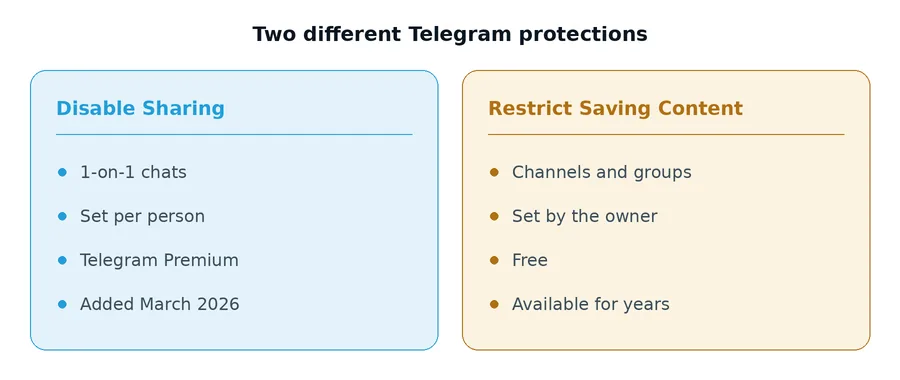
| Disable Sharing | Restrict Saving Content | |
|---|---|---|
| Where it works | 1-on-1 chats | Channels and groups |
| Who turns it on | You, separately for each chat | The channel or group owner |
| Needs Premium | Yes | No |
| Introduced | March 2026 | Several years earlier |
Restrict Saving Content is the one channel owners use. When it is on, members can’t forward posts, and the save option disappears from files in that channel. If you have ever opened a channel and found that you can’t save a video, that is the setting you ran into. We go into it in our article on downloading from private Telegram channels.
Disable Sharing brings a similar idea into private conversations between two people, which until now had no equivalent at all.
What it doesn’t do
It is worth being realistic about any setting like this. It controls what Telegram itself will let someone do with a message. It can’t control what a person does outside the app. Someone determined to keep a message can still photograph their screen with another phone.
So treat it as a strong signal and a real obstacle to casual forwarding, not as a guarantee. For anything truly sensitive, Telegram’s Secret Chats remain the stronger option, since they are end-to-end encrypted and tied to a single device.
Does it affect downloaders?
Short answer: no, and it was never going to.
Downloaders such as Telegram Downloader only work with posts in public channels, using links that anyone can open. A private 1-on-1 chat has no public link, so its messages were never reachable by any outside tool in the first place. Disable Sharing doesn’t change that, and nothing that reads public posts can see into a private conversation.
What does Disable Sharing do on Telegram?
It stops messages in a specific 1-on-1 chat from being shared out of that conversation. You turn it on per person from their profile.
Is Telegram Disable Sharing free?
Not at the moment. It launched in March 2026 as a Telegram Premium feature.
Can I disable sharing in a Telegram group or channel?
Not with this setting. Groups and channels have their own option, Restrict Saving Content, which the owner turns on in the group or channel settings.
Can the other person still take a screenshot?
Disable Sharing is designed to stop sharing inside Telegram. It can’t stop someone photographing their screen with another device, so don’t rely on it for anything you couldn’t afford to have copied.
Based on Telegram’s announcement of March 1, 2026. Features change between versions, so check your own app if something here doesn’t match.